سلاو هاورييان ههێزترین بهرنامه بۆ مۆنتاژ کردن تةنها ناوى ئةو كةنالانةتان بى ئةليم كة ئةم بةرنامة بةكار دةهينن بؤ كارى مونتاج وة لينكى بةرنامةكةش سةرةتا ئةو كةنالانةى كة بةرنامةكة بةكاردةهينن FOX MOVIES TAQUILLA NAT GEO ABUDUBAI ACTION CNN BBC MBC ANIMAUX ART KurdSat سيستمى بيويست بؤ كاركردن : Processor: Intel Core 2 or Core iX CPU. Intel or AMD single core 3 GHz RAM: 1 GB Harddrive Space: 6 GB كورتةيةك لةسةر بةرنامةكة : Edius is a video editing software package originally developed by the Japanese based Canopus Corporation until 2005, when the Canopus Corporation was sold to Grass Valley. The software is capable of 3D editing. The software comes bundled with a large collection of tools. Some of these include NEWBlue Video Filters, proDAD video effects along with image stabilization for unsteady shots. iZotope VST audio plug-ins: Audio Effects Suite, AudioRestore, AGC & Mastering Effects Suite, for the audio mastering needs. Edius is limited to PC users. ببورن هاوريان لةبةر كةمى كات مةجالم نةبوو بة كوردى بؤتان باس بكةم بةلام ئةوةنةى لةسةر ئةنوسم : ئيديوس بةرنامةيةكى بةهيزة بؤ كارى كرافيك و مونتاج كة لة ئاستى جياهن بة بةرنامةيةكى زؤر بةهيز دادةنريت بؤ كارى مونتاج كة ئةم بةرنامةية جةندين برؤكرامسازى بةتوان كاريان تيدا كردووة ئيستاش بةرنامةكة دابكرن http://www.grassvalley.com/products/edius_pro_7 بةهيواى سود سهروهر حسێن 20/2/2015
Now make your Android device in mousepad and trackpad.Use it freely and have experience of technology.
Requires Android – 2.1 and up
Size – 2.3M
Current Version – 1.6.6
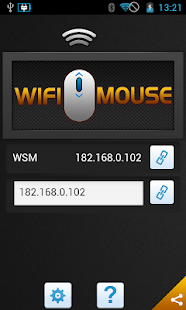
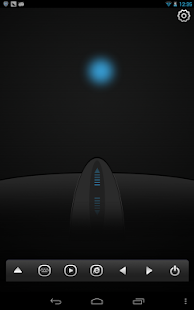
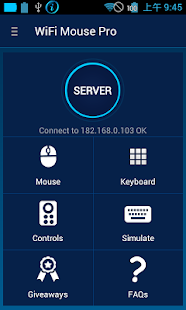
Transform your phone into a wireless mouse, keyboard and trackpad using WiFi Mouse. WiFi Mouse supports speech-to-text as well as multi-finger trackpad gestures. It also support media controller, explorer controller and ppt presentation controller features. WiFi Mouse enables you to control your PC, MAC or HTPC effortlessly through a local network connection.
Features:
ئهمهش ڤیدیۆی
* Mouse cursor movement:
Slide on phone’s screen to make the PC/Mac mouse cursor make movement.
* left and right click support
Tap the phone’s screen to make PC/Mac mouse left button click.
Double fingers tap the phone’s screen to make PC/Mac mouse right button click.
* Middle mouse button scroll
Up/down slide the phone’s middle button picture to make PC/Mac middle mouse button scroll.
Two fingers slide up/down to make PC/Mac middle mouse button scroll.
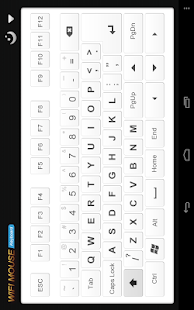
* Remote keyboard input:
Press any mobile phone’s key picture, PC/Mac will do the same thing.
* PC/Mac hot keys and combination key:
You can press two keys at the same time, such as ALT+F4,Ctrl+C,Ctrl+P and so on.
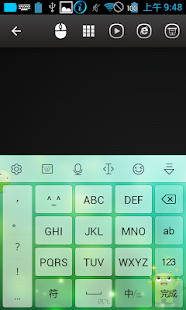
* Speech-to-text input for all languages:
If you input method support voice input, PC/Mac will show the same text as the phone get.
* Close to proximity sensor to show desktop:
When your hands close to the phone’s proximity sensor to make PC/Mac show desktop.
* Mouse & keyboard full screen:
Very big Mouse buttons and key button.
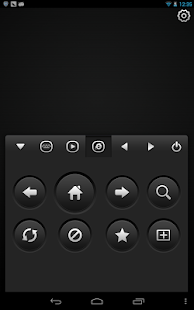
* Remote media player controller:
You can play/pause/next/previous media players, such as Windows media players, VLC,
Winamp and so on.
* Remote explorer controller:
Unified remote control IE/Chrome and other internet explorer, you can close the tab,
go to home page,create new tab, go to favorite list, refresh the current page and so on.
* PPT Presentation controller:
You can start/stop Power Point /Keynote, and turn the next/previous page for presentation.
* Auto-connect on application startup
* PC/Mac window controller:
Maximize/Minimize/close the current window.
* Compatible with XP/Windows Vista/Windows 7/Windows 8/Mac OSX/Linux (Ubuntu,Fedora).
Gestures:
* Tap-to-click
* Tap and move for drag
* Two finger tap for right click
* Two finger scroll
* Pinch to zoom
* Three finger drag or highlight
* Four finger swipe down to show desktop
* Four finger swipe up to maximise current window
* Four finger swipe sideways to change current window focus
* Left handed mouse support (swap left and right mouse click)
* Show desktop when hands over proximity sensor
Note:
1, WiFi Mouse only support Wi-Fi connection(wireless mouse), Bluetooth is not support.
2, More gesture will be added.
3, XMBC will be supported next month.







.jpg)


.jpg)